Handwritten Note Style Video Effect: Add Authentic Handwritten Text to Your Videos
# Handwritten Note Style Video Effect: Add Authentic Handwritten Text to Your Videos
About Handwritten Note
The Handwritten Note style video effect is designed to add a personal and authentic touch to your videos by overlaying handwritten text. This effect is perfect for creating a warm, engaging, and visually appealing look that captures the viewer's attention. Whether you're working on a personal project, a marketing video, or a social media post, the Handwritten Note effect can significantly enhance the visual impact of your content.
Features
- Authentic Handwritten Look: The Handwritten Note effect provides a realistic handwritten text overlay, making your videos feel more personal and engaging.
- Customizable Fonts: Choose from a variety of fonts to match the style and tone of your video. The default font, Pacifico, offers a casual and friendly look.
- Adjustable Font Size: Easily adjust the font size to ensure your text is readable and fits well within your video frame.
- Versatile Applications: Use the Handwritten Note effect for various types of videos, including personal vlogs, marketing content, educational videos, and more.
- Easy Integration: Apply the Handwritten Note effect with just a few clicks, making it a convenient tool for both beginners and experienced video creators.
When to Use Handwritten Note
- Personal Vlogs: Add a personal touch to your vlogs by including handwritten notes that reflect your thoughts and experiences.
- Marketing Videos: Create engaging marketing content that stands out with authentic handwritten text overlays.
- Educational Content: Enhance your educational videos by using handwritten notes to highlight key points and make your content more visually appealing.
How to Apply
1. Select Your Video: Choose the video you want to enhance with the Handwritten Note effect.
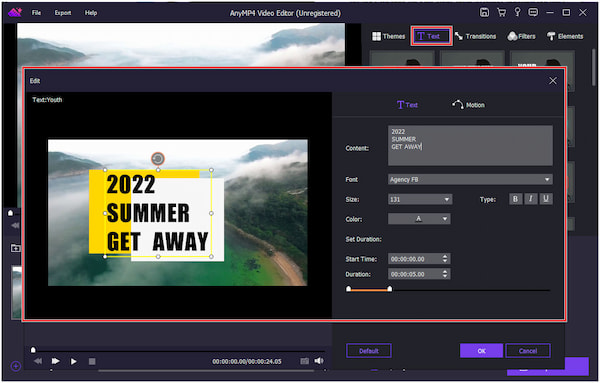
2. Add Text Overlay: Navigate to the text overlay options and select the Handwritten Note style.
3. Customize Your Text: Enter your desired text and customize the font, size, and other settings to match your video's style.
4. Position Your Text: Adjust the position of your handwritten text overlay to ensure it fits well within your video frame.
5. Preview and Apply: Preview your video to see how the Handwritten Note effect enhances your content, then apply the changes.
For more video effects, check out the Podcast Visual and Explosion styles.
Frequently Asked Questions
Ready to try AI video creation?
Start with 200 free credits. No credit card required.
Get Started Free200 credits included · Cancel anytime